:::
跳到主要內容
:::
資源分類
綜合活動-國中7-9年級(四)
過濾條件

搜尋相關的資源 142
106年夏日樂學紀錄片8分鐘精華篇 08:07
video 106年夏日樂學紀錄片8分鐘精華篇
教育部國民及學前教育署國小3-4年級,國中7年級~國中9年級
「夏日樂學」打開學校延伸學習無壓力的大門,走出屬於每所學校自己的特色,在孩子身上看到了快樂學習、創意展現和。
觀看次數978
修改日期:2018-01-06
android
記憶配對大挑戰
app 記憶配對大挑戰
陳思嫻/新北市新北市永和區秀朗國民小學全齡適用
★ 首創全新型態的記憶配對遊戲, 多種前所未見的變化, 包含炸彈卡, 影子卡, 單字卡, 純聲音卡等... 各種不同的難度關卡等你來挑戰.★ 首創全新型態的記憶配對遊戲, 千萬別翻到炸彈喔!★ 所有配對卡都有英文單字發音, 可以訓練英語聽力, 邊玩邊學,寓教於樂!★ 適合各種不同年齡族群, 小朋友學習英文與專注力 , 大人訓練記憶力, 銀髮族活化腦袋不卡卡!★ 提供各種不同的難度 , 簡單(120關), 一般(120關), 困難(120關), 另外也提供練習模式!★ 配對卡片內容包含動物, 水果, 交通工具與日常用品!★ 遊戲卡片庫可以選擇性擴充,建議您下載下方相關的學習卡,遊戲會變得更豐富,學到更多! 陳思嫻 記憶配對大挑戰 僅支援Android相關的平板或手機,需要有google player的帳號即可下載安裝~老師可應用單人競賽或分組競賽的方式, 學生可從遊戲過程中, 訓練其記憶力與專注力, 遊戲過程中會有輔助的英文發音, 可以學到動物,水果,交通工具,日常用品的英文單字, 從遊戲中學習, 達到寓教於樂的目的!從玩樂中訓練您的記憶力!提升右腦圖像記憶力, 最強大腦鍛鍊!提升記憶力,專注力與理解力!所有配對卡都有英文單字發音, 可以訓練英語聽力, 邊玩邊學,寓教於樂!學習中加入遊戲,讓學習不在是枯燥的方式,增添互動與圖片式的記憶輔助,讓學習更有成效及樂趣~
點閱數5042
下載數216
修改日期:2020-03-03
zondle
app zondle
黃玟菁/教育大市集執行團隊國小1年級~國中9年級
The zondle app allows you to play games anywhere to support your learning, to help you remember what you’ve learned in class and to prepare for tests and exams.Teachers create and set topics on the zondle website (www.zondle.com) for you to play in games of your choosing (in this app or on the web). You can also use the zondle website to create your own topics to match exactly what you want to learn, or to view your personal progress.Teachers can also use the zondle website to manage their zondle classes and view progress (with the zondle Gradebook).zondle is FREE and always will be. Thank you for using zondle! zondle 可針對教學需求去設計問題,結合各種遊戲的呈現方式,可讓學生在遊戲中學習,更能吸引住學生注意力。
點閱數590
下載數12
修改日期:2025-04-18
PickMeBuzzer
app PickMeBuzzer
黃玟菁/教育大市集執行團隊國小1年級~國中9年級
COOL FEATURE:-Try with PickMe!Play desktop app available from pickmeplay.com for interfacing with any type of software on your PC or MacFOR BEST OPERATION:- We recommend using an Airport Express Wi-Fi access point with the PickMeBuzzer app for best performance. E-mail us at pickmegames@buzzers.com for more information on configuring a new Airport Express for your event.SUGGESTED USE:- NEW FEATURE: With 1 iPhone and 1 iPad (manual reset, show scoreboard and who buzzed in on big screen) - Allows up to 5 players on an iPad/iPhone to wirelessly connect to another iPhone so you can (1) reset the iPad buzzer system from your iPhone and (2) update names of who buzzes in projected onto a big screen. Step 1:Create game with host deviceStep 2:Connect iPad to TV screen or Projector via accessory cableStep 3:Enter and select created game from iPadStep 4: Select 5 Player Mode on iPadStep 5: Select Scoreboard mode from iPhoneYou can now change the scoreboard and edit names projected on the big screen. Very Cool!- With 1 iPhone or 1 iPad ( stand alone built-in automatic reset) - Use 5 Player Buzzer mode to create a 5 player buzzer system. Connect TV out or VGA cable to device. This will project who buzzed in first onto a big screen (great for classroom, auditorium, and group training sessions). Score and names cannot be changed in this mode. An additional iOS device is required to change names and scoreboard.- With 1 iPhone and 1 iPad (manual reset option) - Allows up to 5 players on an iPad/iPhone to wirelessly connect to another iPhone (and your favorite Desktop software) so you can reset the iPad buzzer system from your iPhone- With 3 or more iPads/iPhones and 1 iPhone - Allows up to 5 players (per iOS device) to join a game created by the host with an iPhoneHave fun with PickMeBuzzer and if you have a special desktop app you want to use with our app let us know!CUSTOMER SATISFACTION POLICY:We take pride at delivering quality software and do not want you to have a bad experience with our apps. One of the most common problems that occur with our PickMeBuzzer App is with the Wi-Fi access point not being open to let the different iOS devices communicate. If you are trying to use a school or company Wi-Fi access point, it might not work due to security settings on the Wi-Fi access point. We suggest when using the PickMeBuzzer App to get your own dedicated access point that works properly with iOS devices to avoid Wi-Fi access point problems. Our apps go through testing to make sure you have the best experience possible, but we have no control over the Wi-Fi access point hardware you decide to use. However, we can recommend what works best with our apps.Please e-mail us at pickmegames@buzzers.com if the app is not working to your satisfaction! We want to make sure the app is working for you. PickMeBuzzer 可在課堂上讓學生們藉由此APP進行搶答。是一個需要付費購買的APP。
點閱數675
下載數16
修改日期:2025-04-18
PingPong - SPOT Networking
app PingPong - SPOT Networking
黃玟菁/教育大市集執行團隊國小1年級~國中9年級,高中10-12年級,高職10年級~高職12年級
PingPong is a tool that enables communication for people who have gathered for a lecture, class, discussion, etc. It can be useful for inducing audience questions, assessing students' understanding, sharing materials easily and selecting winners in draws without a complicated registration process. PingPong- Easy, Fun, and Quick SPOT Networking! Start right now. *Important! PingPong Web Veta version has been launched. If installation is impossible due to OS problems, please visit gogopp.com/web. *Note! If access is impossible due to firewall, open port 49153. ▣ PingPong service features 1. Smart accessibility It can be used on any device: iPhone, iPad PC, etc. 2. Simple access Host and guests can both use the service without registration. 3. Various activities The Host can ask for responses with different methods such as true/false, text, image, etc. 4. Quick results Guests' responses can be checked in real time with graphs, lists, etc. 5. Link to Evernote Materials saved in the Host's Evernote can easily be loaded and shared with the Guests.6. Convenient tool Fun to use with functions such as the timer and random selection. ▣ Difficulties in proceeding.. Disorganized situations where people are chatting and not paying attention.. Awkward situations where people are asking questions not related to the subject.. Situations where you're wondering whether people understand the subject or whether you're explaining things that they already know about.. These situations are all experienced by Host's who host lectures, classes, and events. It is really hard to get peoples' attention and bring fun to places where many people are gathered. However, these problems can all be solved when you use Easy, Fun, and Quick PingPong. ▣ Here's how to use PingPong: 1. Speeches, Seminars Use the [Send Text] function when you want to induce audience questions. Use the [Send Image] function when you want to organize hosts' business card. 2. Classes, Lectures Use the [Multiple Choice 4] function when you are curious about students' understanding. Use the [True/False] function when you are doing a quiz contest. Use the [Send Image] function when you draw your teacher's or friend's face. 3. Discussions, Meetings Use the [Load Evernote] function when you want to show meeting materials. Use the [Share Evernote] function when you want to share minutes from the meeting. 4. Events Use the [Random Selection] function when you want to draw for winners. Also you can apply PingPong usefully in many other different situations. ▣ Main Functions Multiple Choice 4 Multiple Choice 5 True/False Send Text Send Image Load Evernote Share Evernote Timer Random Name PresentationStart using PingPong right away- it's Easy, Fun, and Quick SPOT Networking! ▶ Contact Us • Homepage : http://gogopp.com • E-mail : help@gogopp.com PingPong - SPOT Networking 1.能在多種平臺(iOS與Android) 各式設備上(PC、平板或手機)使用此APP;2.無須註冊即可使用;3.可即時回饋統計資料圖表
點閱數817
下載數38
修改日期:2025-04-18
臺東縣東海國小102年度資訊科技融入創新教學應用團隊
web 臺東縣東海國小102年度資訊科技融入創新教學應用團隊
詹凱賀/縣立東海國小國小4年級~國中9年級
臺東縣東海國小102年度資訊科技融入創新教學應用團隊1. 簡報2. 教學活動影片3. 文本
點閱數951
下載數68
修改日期:2013-11-11
如何在現有圖形製作photocap外框-PhotoCap 多圖外框
web 如何在現有圖形製作photocap外框-PhotoCap 多圖外框
李維哲/縣立水林國中國小4年級~國中9年級
PhotoCap 的多圖外框是個有趣好玩的自製外框功能,有學生問到如何利用現有的圖形製作多圖外框。本範例示範如何將現成的圖形,指定套用照片範圍,製作成photocap的多圖外框。
點閱數1260
下載數24
修改日期:2013-09-06
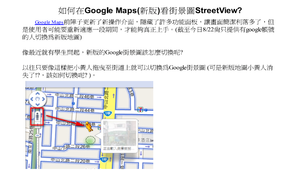
如何在Google Maps(新版)看街景圖StreetView
web 如何在Google Maps(新版)看街景圖StreetView
李維哲/縣立水林國中國小1年級~國中9年級
以往只要把小黃人拖曳至街道上就可以切換為Google街景圖 (可是新版地圖小黃人消失了?,新版的Google街景圖該如何切換呢? )。
點閱數711
下載數4
修改日期:2013-08-22
7上1-5科學記號-油帶魚季學習單
web 7上1-5科學記號-油帶魚季學習單
林容溶/縣立大武國中國中7-9年級
油帶魚是大武鄉特有的魚類,藉由校慶中的油帶魚季活動,融入學生數學科所習得的知識並做運用。
點閱數796
下載數79
修改日期:2012-12-07
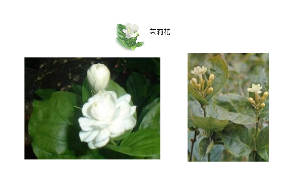
母親節花卉介紹
web 母親節花卉介紹
韓?頤/大橋國小國小1年級~國中9年級
介紹與母親節相關的花卉
點閱數1517
下載數42
修改日期:2022-02-14